Product Overview
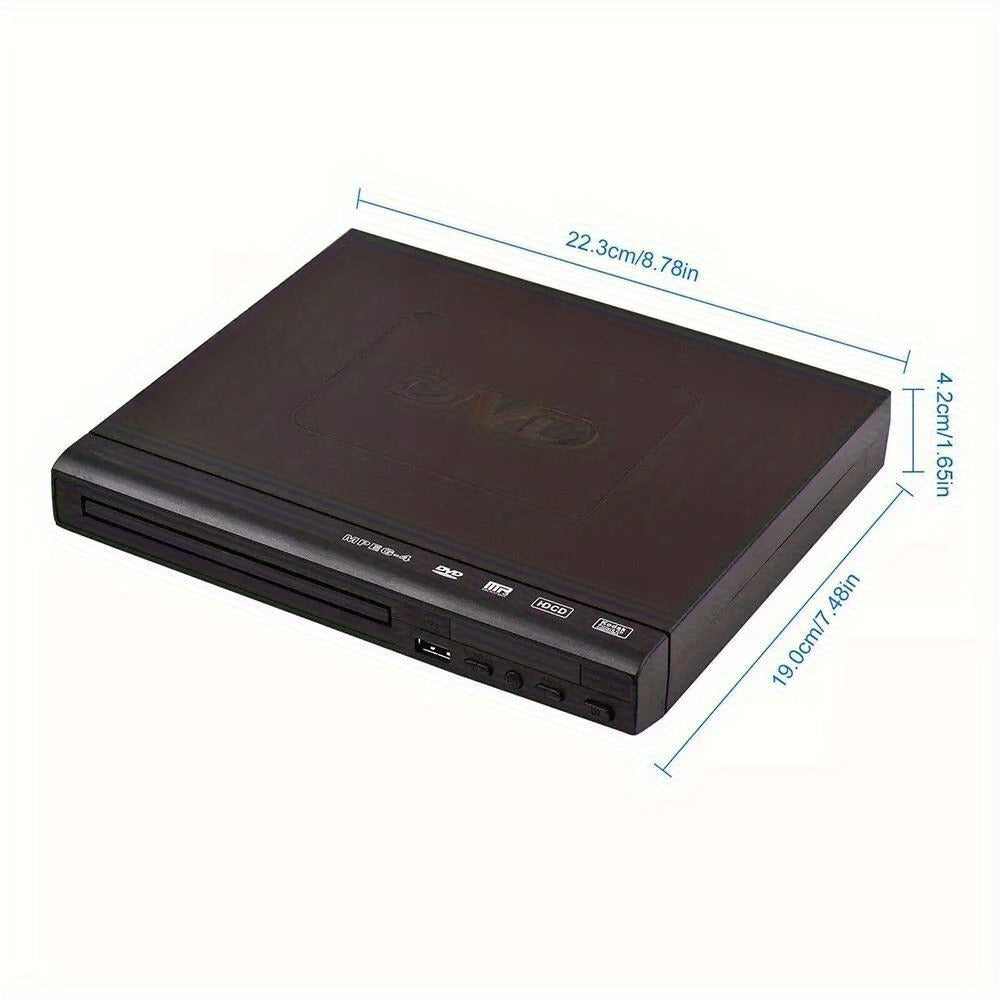
This compact black DVD player has a front disc tray, front USB port, side controls and RCA connection. The gallery labels the body at approximately 22.3 x 18 cm, or 8.78 x 7.09 inches, and pictures a remote control.
Select the exact checkout chassis and output configuration. Connectors, cables, dimensions, remote and supported media details follow only the chosen label, images and received manual.
Key Features
- compact front-loading player
- front USB port
- RCA connection pictured
- side control buttons
- approximately 8.78 x 7.09-inch footprint
No playback-format, disc-region, resolution, upscaling, image-quality, error-correction, surround-sound, eye-protection, heat-dissipation, remote-range, cable-compatibility or electrical-safety guarantee is made.
Specifications
| Product format |
Compact DVD player |
| Checkout label |
Variant1 |
| Reference width |
Approximately 22.3 cm / 8.78 in |
| Reference depth |
Approximately 18 cm / 7.09 in |
| Pictured accessories |
Remote; RCA cable; power lead |
| Variant count |
One |
| Use boundary |
Confirm the player power label and television input type, provide ventilation clearance and follow the received connection and operating instructions. |
Frequently Asked Questions
What is included?
one compact black player with the pictured remote, RCA cable and power lead.
How do I select the right option?
Compare the pictured footprint with the shelf and confirm the TV has matching RCA inputs. Leave room for side controls, front tray travel and cable bends.
How should I set it up or use it?
Place the player on a dry level shelf with the disc tray and vents clear. Power off both devices before connecting the exact HDMI, RCA, AV or other received cable and select the matching TV input.
What should I inspect?
Inspect the power lead, plugs, cable jackets, ports, disc tray and ventilation openings before use. Stop using the player if a cable is damaged, the housing becomes unusually hot or the tray or controls malfunction.
Fast US Shipping
Ships from US warehouse, free delivery 2-7 business days.